

CVS Health review
 Analysis by GetAllApps
I can see why a pharmacy app feels useful right away: a prescription needs attention, a store visit is coming up, or I want to check what health services I can arrange without making another call. CVS Health brings those errands together in one place. After the first burst of convenience, though, its value depends on whether CVS is already part of your routine. If it is, the app can earn a lasting spot on your phone; if not, many of its benefits may be easier to get elsewhere.
Where the early convenience comes from
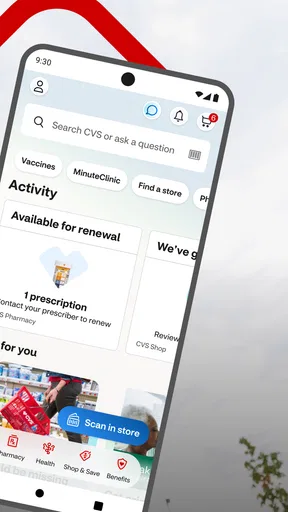
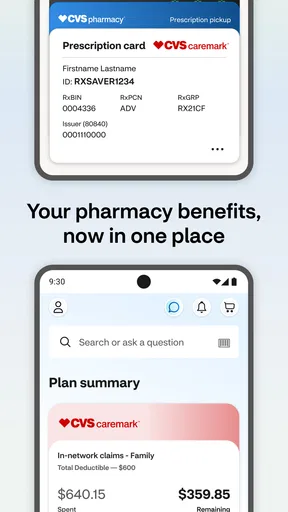
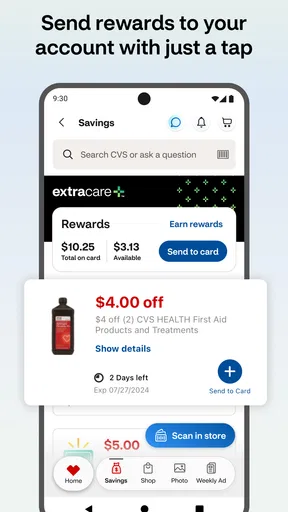
CVS Health is a free medical app from CVS Pharmacy, built around pharmacy tasks, care scheduling, and ExtraCare savings. Its opening appeal is practical rather than entertaining: it gives customers a digital route into services they might otherwise handle at a counter or through separate shopping and scheduling steps. I find that focus helpful because the app has a clear job, even if it does not replace every interaction with a pharmacist or care provider.
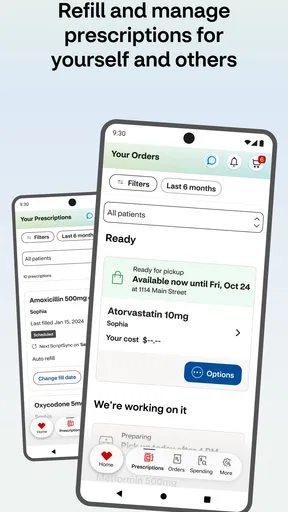
The most immediate reason to try it is prescription management. When a refill is due, having a pharmacy task in an app can be more convenient than remembering to call or stopping by just to ask about it. The benefit is especially noticeable for someone managing several recurring errands: check a prescription, make a health appointment, and look over savings while planning a store visit. These are small conveniences, but they can reduce the number of separate places you need to check.
That convenience is not the same as a promise that every prescription issue can be resolved without help. Pharmacy work can involve timing, availability, or questions that are better handled by staff. I would use the app to make routine steps easier, then contact the pharmacy directly when a medication needs clarification or a situation is time-sensitive. That distinction keeps the app useful without treating it as a substitute for personal pharmacy support.
The care-scheduling side broadens the app beyond refills. For a user who already turns to CVS for health services, keeping scheduling and pharmacy errands close together is a sensible arrangement. It is less compelling for someone whose appointments are already managed through another provider’s system. The app’s value is therefore tied to your existing care habits, not simply to how many tools it places on screen.
A realistic errand, handled in one routine
Imagine noticing that a regular prescription is running low while planning a trip to CVS. I would open the app to take care of the pharmacy task, then check whether there is a relevant ExtraCare offer before heading out. If I also need to arrange a health service, I can consider that in the same planning session rather than remembering it later. The useful part is not that the app eliminates the trip; it helps make the trip and the related tasks more deliberate.
A small habit can make this workflow more dependable: check prescription needs before the household’s usual shopping day, rather than waiting until the last minute. That gives you a chance to spot a task early and decide whether the app is enough or whether you need to speak to the pharmacy. I would not treat a phone notification or an app screen as a reason to delay a direct conversation when a medication question has real consequences.
Who is likely to keep using it
I would recommend trying CVS Health if you fill prescriptions at CVS, shop there often, or expect to use its health services. It has a stronger case for people who return to the same pharmacy than for someone looking for a general-purpose medical organizer. The app is also rated for Everyone, which makes its audience broad, although people should still use appropriate care when managing another person’s health information or appointments.
For occasional CVS customers, the decision is more situational. If you only visit once in a while, a separate app may not save much effort, and the ordinary in-person route may be perfectly adequate. If you regularly use another pharmacy or healthcare provider, that provider’s own app is likely to be more useful for day-to-day records and communication. CVS Health works best when the company is already part of the routine it is trying to simplify.
What remains useful after the first week
The first-week appeal is easy to understand: download it, explore the pharmacy and care options, and see whether the app can take a few errands off your mental list. The more important test is whether it continues to help once the novelty wears off. In my view, the recurring value comes from returning for actual tasks—not from browsing the app just because it is installed.
That makes prescription routines the most durable reason to keep it. A person with regular refills has a natural reason to revisit, while someone with no ongoing pharmacy needs may open the app once and then forget it. ExtraCare savings can add another recurring reason for shoppers who already pay attention to CVS offers, but savings are only valuable when they apply to things you planned to buy. I would avoid letting a coupon or promotion turn a routine purchase into an unnecessary one.
There is a useful trade-off here: combining several CVS-related tasks can save attention, but it also concentrates the app’s usefulness around one retailer and care network. If you want one place for everything across multiple pharmacies and providers, this is not that kind of tool. If your regular errands already center on CVS, the narrower focus can feel efficient rather than limiting.
For a household, the practical question is who will actually maintain the routine. One person may handle pharmacy errands while another manages appointments, and an app only helps if the person responsible can access and use the relevant account features. I would decide in advance who checks refill needs and who books care, rather than assuming that installing the app alone will improve coordination.
Maintenance without turning it into another chore
Any app used for health errands needs a little attention. I would keep the phone’s operating system compatible, install updates when appropriate, and check that the app is still working before relying on it for a task with a deadline. The current version is 26.10.33, and the minimum operating system is 11, so older devices that cannot meet that requirement may need another way to handle CVS tasks.
My maintenance rule would be simple: use the app when there is something to do, not as a daily dashboard. Check it when planning a refill, arranging care, or preparing a CVS shopping trip. That keeps the app from becoming a source of background noise and makes it easier to notice when a task needs attention. If an important issue is urgent, use a direct pharmacy or care contact rather than waiting for an app workflow to resolve it.
It is also worth checking the details on the screen before acting. Pharmacy and appointment tasks are specific to the person and the situation, so I would confirm that I am handling the right prescription or service before proceeding. That is a modest habit, but it matters more than exploring every corner of the app. A convenient interface does not remove the need to read carefully.
Where fatigue can set in
The main source of fatigue is the app’s dependence on repeat use. If you do not fill prescriptions at CVS, book its services, or shop there, there may be little reason to keep opening it. That is not necessarily a flaw; it is a focused companion to a particular set of errands. But it does mean that the app can feel like extra clutter for someone whose healthcare is spread across other organizations.
Another limitation is that digital convenience cannot answer every personal question. A refill request is different from asking whether a medication is suitable alongside another treatment, and scheduling is different from getting individualized medical guidance. I would use CVS Health for the practical steps it supports and speak with a qualified professional for health decisions that need context. Treating a pharmacy app as a general medical adviser would be the wrong expectation.
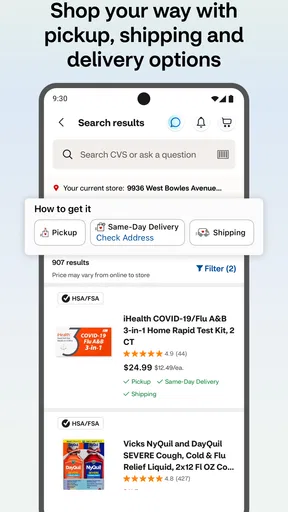
The app also competes with simpler alternatives. Calling or visiting a pharmacy can be better when a task is unusual, confusing, or urgent. A healthcare provider’s own app may be preferable if your main need is to coordinate care outside CVS. And for a person who only wants to compare store offers occasionally, checking during a planned shopping trip may be less effort than maintaining another app. The right choice depends on which tasks recur in your life.
There is also the ordinary friction of keeping a service-specific app installed: it takes space, may need occasional updating, and asks you to remember another place to look. I do not see that as a serious burden for regular CVS customers, but it matters for people who prefer to keep their phones lean. Before installing, it is worth asking whether you expect to use at least one of its main functions repeatedly.
Reputation, fit, and the lasting verdict
CVS Health has an average rating of 4.5 from around 507 thousand ratings, with roughly 160 thousand written reviews and more than 10 million installs. Those figures suggest that it is widely used, but I would not read them as a guarantee that every pharmacy interaction will be smooth. The experience depends partly on whether CVS is your pharmacy and whether the task you need is a routine one the app is suited to handle.
For a regular CVS customer, I think it can earn lasting space because its core tasks recur naturally: handling prescriptions, arranging care, and checking savings while planning a visit. Its release dates back to June 15, 2011, and it remains free, which makes trying it a low-commitment decision. The strongest reason to keep it is not the number of features; it is the small amount of effort it may save each time a familiar errand comes around.
For someone who rarely uses CVS, I would skip it unless a specific upcoming task gives it a clear purpose. A pharmacy you use more often, a provider’s own app, or a direct call may serve you better. That is the most honest way to judge this app: it is not a universal medical toolkit, but a practical helper for people whose pharmacy and shopping habits already overlap with CVS.
My long-term verdict is favorable with a clear condition. CVS Health deserves a place on my phone when I expect to return to CVS for prescriptions, care scheduling, or ExtraCare offers; otherwise, the initial convenience is likely to fade. If you install it, anchor it to one recurring task and see whether it genuinely makes that task easier. Its lasting value comes from fitting an existing routine, not from creating a new one.
As a medical app, it is a focused option from CVS Pharmacy rather than a replacement for professional advice or every provider’s system. CVS Health is best for people who want pharmacy errands and related CVS services close at hand, while occasional visitors may be better served by the alternatives they already use. The app’s broad reach—reflected in its 4.5 average rating and 10 million-plus installs—makes it easy to consider, but your own repeat needs should make the final decision.
Pros and cons
Pros
- Refill eligible prescriptions directly through the app.
- Check prescription status without calling the pharmacy.
- Set reminders to help you take medication on schedule.
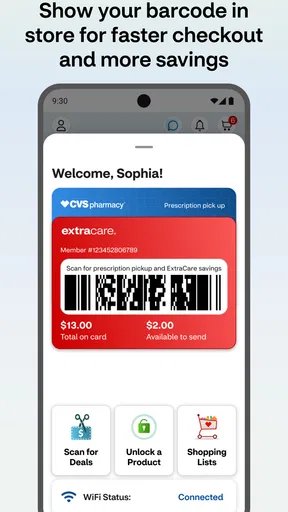
- View ExtraCare deals and track available rewards.
- Use the store locator to find nearby CVS locations.
Cons
- Some prescriptions require pharmacist approval before refills are processed.
- App features may vary by pharmacy and location.
- Account setup requires personal information.
- Prescription details may take time to update.
- Some users may find the app crowded with shopping offers.


